Happy Halloween from the Google AdSense Team!
Friday, October 29, 2010
Thursday, October 28, 2010
Western Union now in Thailand
After launching in four African countries earlier this month, we're excited to announce the arrival of Western Union Quick Cash® payments for Thailand!
For those of you who are not familiar with this form of payment, Western Union Quick Cash payments are free of charge and will reach you faster than checks. Payments will continue to follow our normal payment schedule and will be available for pickup in your local currency at your local Western Union agent the day after they're issued.
A couple of things to note: We can send Western Union payments only to publishers that have an individual account at this time. Also, the payee name on your account must exactly match the government-issued ID card that you'll use when picking up your payments. For more information on how to sign up for and pick up Western Union payments, please visit our Help Center.
Posted by Deborah Chang - AdSense Payments team
For those of you who are not familiar with this form of payment, Western Union Quick Cash payments are free of charge and will reach you faster than checks. Payments will continue to follow our normal payment schedule and will be available for pickup in your local currency at your local Western Union agent the day after they're issued.
A couple of things to note: We can send Western Union payments only to publishers that have an individual account at this time. Also, the payee name on your account must exactly match the government-issued ID card that you'll use when picking up your payments. For more information on how to sign up for and pick up Western Union payments, please visit our Help Center.
Posted by Deborah Chang - AdSense Payments team
Wednesday, October 27, 2010
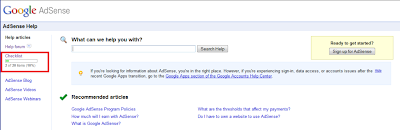
Make the most of your AdSense experience with our new checklist
Starting a new program can be overwhelming. What steps should you take to get off on the right foot and make the most of your account? To help you make your way with AdSense, we're delighted to introduce the AdSense Checklist to publishers viewing our U.S. Help Center.
If your language preference is set to U.S. English and you are logged in your Google Account, you'll find the checklist in the left navigation bar of the Help Center. You can recognize it by the progress bar. The checklist is divided into five parts, offering basic recommendations, required steps, and tips to help you grow your account to its full potential.
When you check an item, you'll see the progress bar update accordingly. This will help you in several ways. If you're new to AdSense, you'll get a clear overview of what steps to follow to make the most of your account. If you’re already an experienced AdSense publisher, you'll also have the chance to revisit the basics, and further develop your use of the program.
The progress bar can help you identify quickly how many of the recommended steps you’ve completed, and the checklist will suggest which step you can take next.
We hope that this Help Center feature will be useful to you and help you grow with the AdSense program! If you have other great ideas for ways to help newbies get started with AdSense or thoughts on how to make the checklist even better, join the conversation in our forum.
Posted by Natalia Niznik - Inside AdSense team
If your language preference is set to U.S. English and you are logged in your Google Account, you'll find the checklist in the left navigation bar of the Help Center. You can recognize it by the progress bar. The checklist is divided into five parts, offering basic recommendations, required steps, and tips to help you grow your account to its full potential.
When you check an item, you'll see the progress bar update accordingly. This will help you in several ways. If you're new to AdSense, you'll get a clear overview of what steps to follow to make the most of your account. If you’re already an experienced AdSense publisher, you'll also have the chance to revisit the basics, and further develop your use of the program.
The progress bar can help you identify quickly how many of the recommended steps you’ve completed, and the checklist will suggest which step you can take next.
We hope that this Help Center feature will be useful to you and help you grow with the AdSense program! If you have other great ideas for ways to help newbies get started with AdSense or thoughts on how to make the checklist even better, join the conversation in our forum.
Posted by Natalia Niznik - Inside AdSense team
Subscribe to:
Posts (Atom)